what happens when you visit https://example.com (and why)
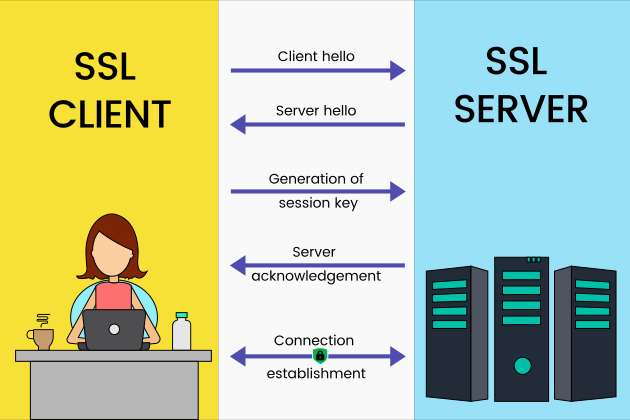
HTTPS is secure because of TLS (formerly SSL). HTTPS = HTTP + TLS. SSL stands for Secure Sockets Layer. TLS is Transport Layer Security
- The browser resolves
example.com→ an IP address (via DNS). - The browser opens a TCP connection to the server IP on port 443.
- TLS handshake begins: client (browser) sends a clienthello, which includes:
- Supported TLS versions (e.g., TLS 1.2 / 1.3)
- Supported cipher suites
- Random data used for key generation
- Server responds with ServerHello + Certificate
- TLS version
- certificate chain (server cert + intermediate certs)
- Under the TLS session, HTTPS requests begin, like
GET / PATH, you can sed cookies, tokens, page content, etc.
How a Cert Works
Imagine a very simple setup where a server publishes a public key for encryption.
Now imagine an attacker sitting on the network. The attacker could:
- Intercept your connection
- Generate their own public/private key pair
- Send you their public key instead
- Relay traffic between you and the real server
In that scenario, the attacker could:
- Steal cookies
- Inject malicious JavaScript
- Modify responses
This is a classic man-in-the-middle attack. Encryption alone is not enough — you must also verify who owns the public key. This is where certificates come in - your browser needs a trusted third party to say:
“I verify that this public key belongs to
example.com.”
That trusted third party is a Certificate Authority (CA).
However, directly using the Root CA to sign every certificate would expose its private key to unnecessary risk. Instead, we use a chain of trust:
1
2
3
4
5
Root CA (self-signed, trusted by OS)
↓
Intermediate CA
↓
Server certificate (example.com)
The Root CA remains highly protected and rarely used. Intermediate CAs handle day-to-day certificate issuance.
Certificate issuance process
example.comgenerates:- A public key
- A private key (kept secret)
example.comsends the CA:- Its public key
- Its domain name
- A Certificate Signing Request (CSR)
- The CA verifies that the requester controls
example.comusing methods such as:- DNS validation
- HTTP validation
- Email verification
- After verification, the CA:
- Creates a certificate containing the domain name and public key
- Computes a hash of the certificate contents
- Signs that hash using the CA’s private key
This signature is the digital signature on the certificate.
- When a browser connects to
example.com, it:- Receives the certificate
- Uses the CA’s public key (already trusted in the OS or browser trust store)
- Verifies the digital signature
Public Key vs Private Key
Public key: can be shared with anyone, private key: only kept to oneself.
1
a = b mod c
it means when a/c and b/c have the same remainder/
In a very simple RSA example:
1
2
3
4
5
6
7
8
9
10
11
12
13
14
15
16
17
18
19
20
21
22
23
# 1. pick two prime numers
a = 5
b = 11

# 2. get their product
ab = a * b = 55

# 3. Compute Euler's Totient
t = (a-1)(b-1) = 40

# 4. Choose a public exponent
- pick a number e such that 1 < e < 40;
- greatest_common_divisor(e, 40) = 1
We pick e=3

# 5. private exponent:
e*d = 1 mod 40
=> 3d = 1 mod 40 (so 3d / 40's remainder is 1)
3d = 81 => d = 27

# 6 Final keys
public keys: (ab = 55; e = 3)
private keys: (ab = 55; d = 27)
Usage 1 - Encryption
Now, suppose we have a message m=7. To encrypt:
1
2
3
4
5
6
7
m = 7

# 1 encrypt using public key:
c = m^e mod ab
c = 7 ^ 3 mod 55 = 343 mod 55 = 13

# So the encrypted message is 13
To decrypt
1
2
m = c ^ d mod ab
= 13 ^ 27 mod 55 = 7
Usage 2 - Digital Signature
Now reverse the process. For the cert to sign message m = 7:
1
signature = m ^ d mod ab = 7 ^ 27 mod 55
Now, your browser can verify using its public key, then compare the result with the original message:
1
2
m = signature ^ e mod ab = 7
# here is a match, bingo
For example,. when example.com asks a CA for a cert.
In real life, RSA uses prime numbers that are 2048 or 4096 bit long, so factoring encrypted results is infeasible.
Intermediate CA vs Root CA
Root CA does not participate in the handshake at all. It only sign the intermediate CA’s certificate. A root CA usually lasts 20 - 30 years. It’s stored in an OS / Browser’s trust stores.
When does an intermediate CA gets revoked / replaced?
- Intermediate CA’s cert expired, usually in 5-15 years. In that case, it must generate a new intermediate key pair, then signed by the root.
- RARE: Intermediate CA’s private key is compromised. Then the CA will revoke the intermediate, browsers may blocklist the intermediate, and all certs issued by that intermediate may need an replacement.
- This happened when SHA-1 was deprecated. CAs reiisued intermediates using SHA-256
